In an increasingly connected world, your internet speed isn't just a luxury; it's a fundamental utility that impacts nearly every aspect of your digital life. From streaming your favorite shows in stunning 4K to seamless video calls with loved ones, and from intense online gaming sessions to working from home, the bandwidth you have can make or break your experience.
As we look towards 2025, internet service providers (ISPs) offer a dizzying array of speed tiers. Two common options that often leave consumers pondering are 50 Megabits per second (Mbps) and 100 Mbps. On paper, 100 Mbps is twice as fast as 50 Mbps, but what does that really mean for your everyday usage? Is the extra speed a necessity or an extravagance? And how much of a difference will it truly make in your home, especially with more devices and higher demands than ever before?
This comprehensive guide from TechCalc will break down the real-world implications of 50 Mbps versus 100 Mbps internet speeds. We'll dive into specific scenarios, analyze data, and help you determine which speed tier offers the best value and performance for your unique needs in 2025.
Quick Verdict: 100 Mbps vs 50 Mbps
| Feature | 50 Mbps | 100 Mbps |
|---|---|---|
| Best For | Single-user households, basic browsing, SD/HD streaming, light online gaming. | Multi-user households, 4K streaming, competitive online gaming, frequent large downloads, multiple video calls. |
| Download Time | Noticeably slower for large files. | Significantly faster for large files (roughly half the time of 50 Mbps). |
| Streaming | Good for 1-2 HD streams, single 4K stream with potential buffering. | Excellent for 2-3+ 4K streams simultaneously, no buffering. |
| Online Gaming | Playable for most games, but large updates can be slow. | Smooth, low-latency experience, fast game downloads/updates. |
| Work/Learn From Home | Sufficient for one user, single video call. | Ideal for multiple users, multiple concurrent video calls, cloud-heavy work. |
| Cost | Generally more affordable. | Typically a moderate price increase over 50 Mbps. |
| Recommendation | Budget-conscious single users or light usage. | Most households with multiple users or demanding online activities. |
Understanding Mbps: The Language of Speed
Before we dive into the comparison, let's clarify what "Mbps" means. Mbps stands for Megabits per second. This unit measures the rate at which data is transferred over your internet connection.
- Download Speed: This is how quickly data travels from the internet to your devices. It affects how fast web pages load, videos stream, and files download. This is typically the speed ISPs advertise most prominently.
- Upload Speed: This is how quickly data travels from your devices to the internet. It's crucial for activities like video calls (sending your video feed), uploading large files to cloud storage, or live streaming your own content. While often lower than download speeds, it's an increasingly important metric.
When an ISP advertises "50 Mbps" or "100 Mbps," they are almost always referring to the maximum theoretical download speed. Actual speeds can vary due to network congestion, Wi-Fi interference, your equipment, and the server you're connecting to.
50 Mbps: The Baseline for Modern Connectivity
For many years, 50 Mbps was considered a robust internet speed, and it still holds its own for specific use cases in 2025. It represents a solid entry point into reliable broadband.
What 50 Mbps Is Good For:
- Basic Web Browsing: Loading websites, checking email, and scrolling social media are typically seamless.
- Standard Definition (SD) Streaming: You can easily stream multiple SD videos simultaneously without buffering.
- High Definition (HD) Streaming: One or two concurrent HD (1080p) streams on platforms like Netflix, Hulu, or YouTube are usually fine.
- Light Online Gaming: Casual online games or even some competitive titles can be played, though large game updates might take time.
- Single-User Households: An individual user can comfortably perform most online activities.
- Video Calls: A single video conference call (e.g., Zoom, Microsoft Teams) generally runs smoothly.
Limitations of 50 Mbps:
While capable, 50 Mbps can start to show its limits when multiple users are active or when engaging in bandwidth-intensive activities:
- Multiple 4K Streams: Attempting to stream 4K content on more than one device simultaneously will likely lead to buffering.
- Large Downloads: Downloading massive game files (50-100GB+) or large software updates can take several hours.
- Heavy Cloud Usage: Syncing large files to cloud storage (Google Drive, Dropbox) can be slow, especially with lower upload speeds.
- Multi-User Congestion: In a household with 3+ people all actively using the internet (streaming, gaming, video calls), 50 Mbps can feel sluggish.
100 Mbps: The Modern Sweet Spot
Doubling the speed to 100 Mbps dramatically expands your internet capabilities, making it an excellent choice for the average modern household. It provides a significant buffer for multiple devices and demanding applications.
What 100 Mbps Is Good For:
- Seamless 4K Streaming: You can comfortably stream 4K content on 2-3 devices simultaneously without buffering.
- Competitive Online Gaming: Provides a more stable and responsive experience, with faster game downloads and updates.
- Multiple Users & Devices: Ideal for households with 3-5+ people, each with multiple devices (smartphones, tablets, laptops, smart TVs) actively using the internet.
- Work and Learn From Home: Supports multiple concurrent video calls, large file transfers, and cloud-based applications without interruption.
- Faster Downloads & Uploads: Significantly reduces waiting times for large files, making software updates, game downloads, and cloud backups much quicker.
- Smart Home Ecosystems: Handles the increased traffic from smart security cameras, smart speakers, and other IoT devices effortlessly.
Advantages of 100 Mbps over 50 Mbps:
The primary advantage is the significantly increased bandwidth, which translates directly to:
- Reduced Buffering: Especially for high-resolution video.
- Smoother Multi-Tasking: No slowdowns when one person is gaming while another streams and a third is on a video call.
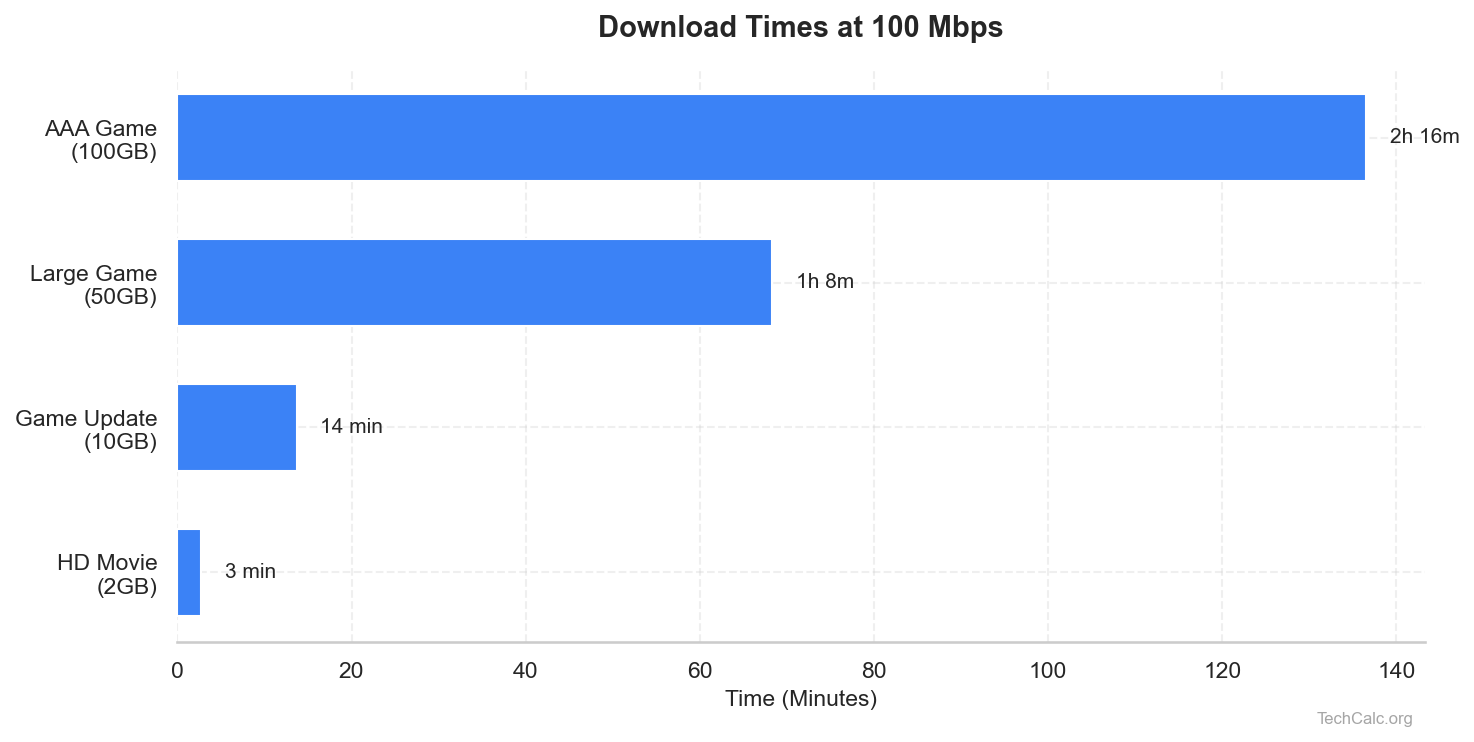
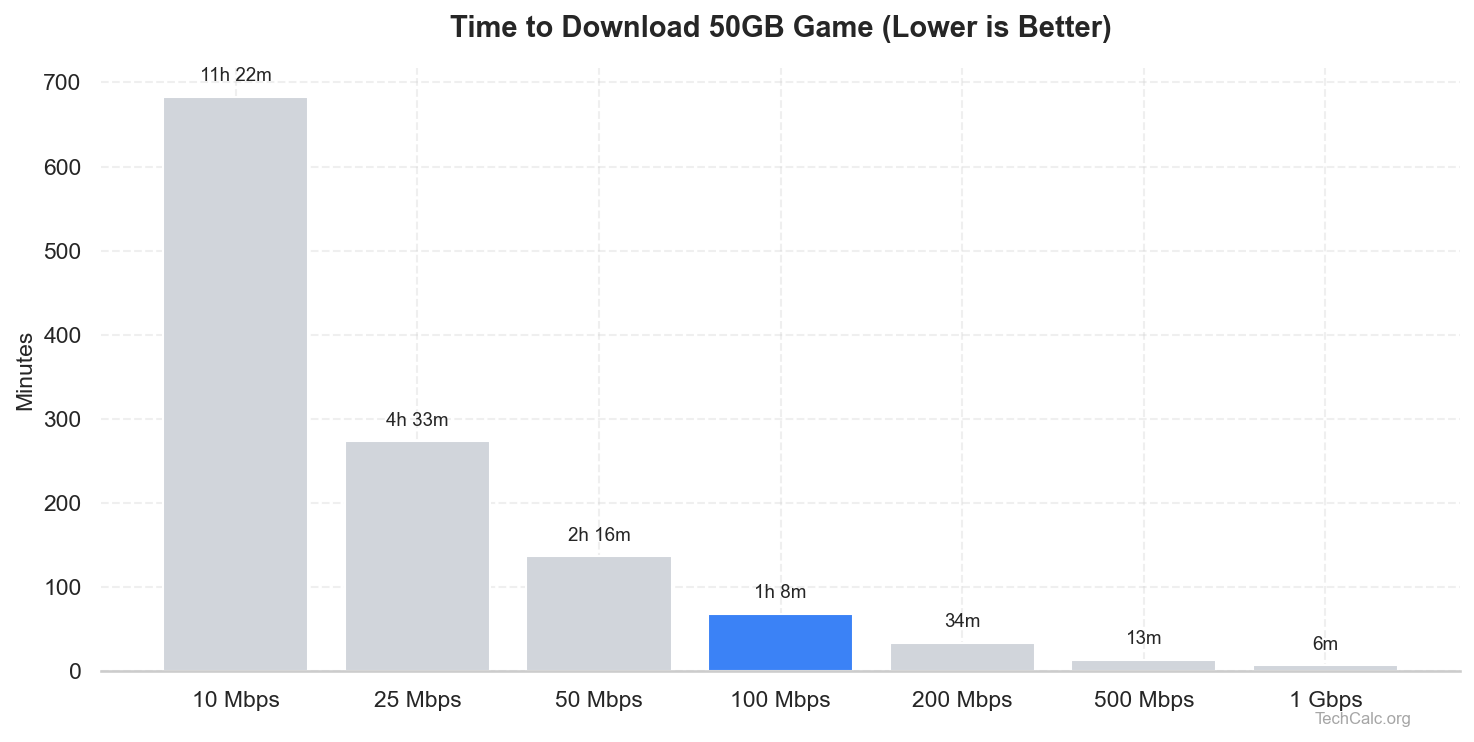
- Quicker Downloads: A 50GB game download could go from ~2.5 hours to ~1.25 hours.
- Better Future-Proofing: As more devices and higher-quality content emerge, 100 Mbps offers more headroom.
Direct Comparison: 100 Mbps vs 50 Mbps in Action
Let's look at how these speeds stack up in real-world scenarios.
1. Download Times
This is where the difference is most noticeable. For large files, doubling your speed effectively halves your waiting time.
| File Size | Activity | Approximate Download Time (50 Mbps) | Approximate Download Time (100 Mbps) |
|---|---|---|---|
| 1 GB | Large Photo Album, Software Update | 2 minutes 40 seconds | 1 minute 20 seconds |
| 5 GB | HD Movie, Small Game | 13 minutes 20 seconds | 6 minutes 40 seconds |
| 20 GB | Large PC Game, Software Suite | 53 minutes 20 seconds | 26 minutes 40 seconds |
| 50 GB | Ultra HD Movie, Major Game | 2 hours 13 minutes 20 seconds | 1 hour 6 minutes 40 seconds |
| 100 GB | Console Game, OS Backup | 4 hours 26 minutes 40 seconds | 2 hours 13 minutes 20 seconds |
(Note: These are theoretical maximums. Actual times may vary due to server speeds, network congestion, and overhead.)
Need to calculate specific download times? Use our download time calculator!
2. Streaming Quality & Quantity
Different streaming resolutions require different amounts of bandwidth.
| Activity/Resolution | Minimum Recommended Bandwidth | 50 Mbps (Concurrent Streams) | 100 Mbps (Concurrent Streams) |
|---|---|---|---|
| SD (480p) | 3 Mbps | 16+ | 33+ |
| HD (720p) | 5 Mbps | 10 | 20 |
| Full HD (1080p) | 8 Mbps | 6 | 12 |
| 4K Ultra HD | 25 Mbps | 2 (potential buffering) | 4 |
Source: Netflix, Hulu, YouTube recommendations. Actual usage can vary.
As you can see, 100 Mbps provides ample room for multiple 4K streams, making it ideal for households with multiple smart TVs or family members who enjoy high-quality content.
3. Online Gaming Experience
While gaming doesn't always require massive bandwidth during gameplay, a faster connection significantly improves the overall experience, especially for updates and initial downloads.
| Aspect | 50 Mbps Experience | 100 Mbps Experience |
|---|---|---|
| Download Games/Updates | Can take hours for large titles (50GB+), potentially disrupting play sessions. | Significantly faster, reducing waiting times from hours to minutes for most updates. |
| Gameplay Latency (Ping) | Generally acceptable (latency is more about distance to server and network stability than raw speed, but high bandwidth helps prevent congestion-induced lag). | Excellent (same as 50 Mbps for raw ping, but better at preventing bandwidth bottlenecks). |
| Streaming Gameplay (Twitch/YouTube) | Possible for single-user streaming in HD, but might struggle with higher quality or multiple background tasks. | Smooth and reliable for high-quality streaming (1080p+), even with other network activity. |
| Multiplayer Stability | Generally stable for 1-2 gamers, but can be impacted by other heavy users on the network. | Very stable for multiple gamers, robust against other network demands. |
4. Multi-User Households & Remote Work/Learning
The more people and devices connected, the more bandwidth you need.
| Scenario | 50 Mbps Suitability | 100 Mbps Suitability |
|---|---|---|
| Single User | Excellent for all activities. | Overkill, but provides maximum responsiveness. |
| 2 Users | Good for simultaneous HD streaming/browsing. Might struggle with 4K + gaming. | Excellent for all simultaneous activities. |
| 3-4 Users | Can experience slowdowns with multiple HD/4K streams, gaming, and video calls. | Excellent; handles diverse, simultaneous heavy usage. |
| 5+ Users | Likely to experience significant congestion and frustration. | Very Good; generally sufficient for most large families. |
| Remote Work/Learning (Video Calls) | Fine for one user's video calls. Might struggle with multiple concurrent calls. | Excellent for multiple simultaneous video calls (e.g., parents working, kids learning). |
| Cloud Backups/Transfers | Slow for large daily backups or frequent large file sharing. | Much faster, allowing for more efficient cloud workflows. |
Factors Influencing Your Real-World Speed
The advertised speed from your ISP is a theoretical maximum. Several factors can affect the actual speed you experience:
- Wi-Fi vs. Ethernet: A wired (Ethernet) connection will almost always be faster and more stable than Wi-Fi. Wi-Fi signals can be affected by distance, obstacles, and interference from other devices.
- Router Quality & Age: An old or low-quality router might not be able to deliver the full speed of your internet plan, especially over Wi-Fi. Upgrading to a Wi-Fi 6 or Wi-Fi 6E router can make a significant difference.
- Device Capabilities: Older devices (laptops, phones, smart TVs) might have older Wi-Fi adapters or less powerful processors that can't fully utilize higher speeds.
- Network Congestion: During peak hours, if many users in your area are online, your overall speed can temporarily drop.
- Server Speed: The speed at which you download a file or stream content is also limited by the server providing the data. If the server is slow or overloaded, your download will be slow regardless of your internet speed.
- Background Applications: Downloads, updates, or cloud syncing running in the background on your devices can consume bandwidth.
Who Needs 50 Mbps?
50 Mbps is a cost-effective choice for:
- Single-person households: If you live alone and primarily browse, stream HD content, and occasionally game.
- Couples with light usage: If you and your partner mostly browse and stream one HD show at a time.
- Budget-conscious users: If saving money is a top priority and your usage habits align with the capabilities of 50 Mbps.
- Households with minimal smart devices: If you don't have many smart cameras, speakers, or other IoT devices constantly using bandwidth.
Who Needs 100 Mbps?
100 Mbps is an excellent choice and often the recommended minimum for:
- Families or multi-person households (3+ people): Especially if multiple people are streaming, gaming, or on video calls simultaneously.
- Households with 4K TVs: To ensure smooth, buffer-free 4K streaming on multiple devices.
- Avid online gamers: For faster game downloads, updates, and a more stable competitive experience.
- Remote workers or students: Who rely on video conferencing, large file transfers, and cloud-based applications.
- Content creators or streamers: Who need reliable upload speeds (though check your ISP's specific upload speed for 100 Mbps plans, as it's often asymmetric).
- Smart homes: With multiple connected devices that constantly use bandwidth (security cameras, smart assistants, etc.).
- Anyone who values speed and responsiveness: If you dislike waiting for downloads or experiencing buffering, 100 Mbps provides a noticeable upgrade.
Cost Considerations
The price difference between 50 Mbps and 100 Mbps plans can vary significantly by ISP and region. Often, the jump from 50 Mbps to 100 Mbps is a relatively small increase in your monthly bill (e.g., $5-$15). Given the substantial increase in performance, this small additional cost is often well worth it for the improved experience, especially for multi-user households.
Always check promotional offers and bundle deals from ISPs in your area, as you might find 100 Mbps (or even higher) plans available for a similar price to a standard 50 Mbps plan.
How to Test Your Current Internet Speed
Unsure what speed you're currently getting? It's easy to check:
- Use a wired connection: If possible, connect your computer directly to your router with an Ethernet cable for the most accurate reading.
- Close other applications: Ensure no other devices are streaming, downloading, or running heavy tasks in the background.
- Visit a speed test website: Popular options include Speedtest.net by Ookla, Fast.com (powered by Netflix), or Google's own speed test (search "internet speed test").
- Run the test: Note your download and upload speeds.
Comparing these results to your advertised plan speed can help you identify if your equipment or network conditions are limiting your performance.
Making the Right Choice for 2025
The decision between 50 Mbps and 100 Mbps ultimately comes down to your household's specific needs, number of users, and budget.
- If you're a single user or a couple with minimal internet demands, 50 Mbps might still be perfectly adequate and save you a few dollars each month.
- However, for most modern households in 2025 – especially those with multiple users, 4K streaming devices, gamers, or remote workers/learners – 100 Mbps offers a significant and often necessary upgrade. The smoother experience, faster downloads, and greater capacity for multiple concurrent activities make it the clear winner for value and performance.
Consider your current and future internet usage. Are you planning to add more smart devices? Will family members be working or learning from home more often? Opting for 100 Mbps provides a comfortable buffer and future-proofs your connection against increasing demands.
Conclusion
In the battle of 100 Mbps vs 50 Mbps, 100 Mbps generally emerges as the superior choice for the vast majority of users in 2025. While 50 Mbps can still suffice for light individual use, the demands of modern digital life – from high-resolution streaming and online gaming to multi-device households and remote work – increasingly push past its limits.
Investing in 100 Mbps provides a noticeable boost in performance, reduces frustration from buffering and slow downloads, and ensures a smoother, more enjoyable online experience for everyone in your home. Before making your final decision, evaluate your household's unique needs, check local ISP offers, and remember that a little extra speed often goes a long way in today's connected world.