Yes, a 20mbps internet speed can be enough for a single user or a small household with light internet habits in 2025 — you can typically stream HD video, browse the web, and handle basic work tasks without major issues. However, here's the catch that many ISPs won't emphasize: its limitations become glaringly obvious with multiple simultaneous users, 4K streaming, or frequent large file downloads. If your household has more than two people actively using the internet for streaming or gaming at the same time, or if you regularly download big files, you'll quickly hit the ceiling of what 20 Mbps can comfortably provide.
⚡ Quick Verdict:
- ✅ Yes for 1-2 people browsing, streaming HD, or basic work
- ⚠️ Maybe for 2-3 people with moderate, non-simultaneous use
- ❌ No for 4+ people, 4K streaming, heavy gaming, or large downloads
- 👉 Key Factor: Simultaneous activity and quality of streams dictate performance
What Does 20 Mbps Internet Speed Really Mean?
When your internet service provider (ISP) advertises a 20mbps internet speed, they're referring to 20 megabits per second. This is the theoretical maximum data transfer rate your connection can achieve. It's crucial to understand the difference between "megabits" (Mb) and "megabytes" (MB):
- Mbps (megabits per second): Used for internet speed.
- MBps (megabytes per second): Used for file sizes and actual download/upload rates.
There are 8 megabits in 1 megabyte. So, a 20 Mbps connection translates to a maximum download speed of approximately 2.5 MBps (Megabytes per second). This is a vital distinction when you're estimating how long it will take to download a file. For example, a 1 GB (1000 MB) file would take roughly 6 minutes and 40 seconds to download at a consistent 2.5 MBps. You can use our handy Download Time Calculator to get precise estimates for various file sizes and speeds.
Is 20 Mbps Enough for Work From Home?
For many individuals working from home, a 20mbps internet speed can be perfectly adequate, especially if you're the primary user. Here's a breakdown:
- Video Conferencing: A single high-definition (HD) video call (e.g., Zoom, Microsoft Teams) typically requires 2-4 Mbps for a smooth experience. So, 20 Mbps provides ample headroom for one person.
- Cloud Applications: Using cloud-based documents (Google Docs, Office 365), email, and CRM systems consumes very little bandwidth, usually less than 1 Mbps.
- Web Browsing and Email: These activities are light on bandwidth, generally needing less than 1 Mbps.
However, potential issues arise when:
- Multiple Users: If another family member is streaming 4K video or downloading a large game while you're on a critical video call, your 20 Mbps connection will struggle to handle both simultaneously, leading to lag or dropped calls.
- Large File Transfers: Regularly uploading or downloading large files (e.g., graphic design assets, video edits, software builds) can quickly consume your entire 20 Mbps bandwidth, making other online activities sluggish for everyone.
- High-Resolution Video Calls: While 20 Mbps handles standard HD calls, if you're frequently participating in calls with multiple participants sharing high-resolution screens, you might experience minor slowdowns.
In summary, for a single person primarily doing standard remote work, 20 Mbps is usually sufficient. For households with multiple remote workers or heavy data demands, it might be a bottleneck.
Is 20 Mbps Good for Smart TV?
The suitability of a 20mbps internet speed for your smart TV largely depends on the streaming quality you desire and how many devices are streaming concurrently.
- Standard Definition (SD) Streaming: Requires around 1-3 Mbps. 20 Mbps is more than enough.
- High Definition (HD) Streaming (720p/1080p): Most services recommend 5-8 Mbps for a single HD stream. So, 20 Mbps can comfortably handle 2-3 simultaneous HD streams.
- 4K Ultra HD (UHD) Streaming: This is where 20 Mbps starts to feel restrictive. A single 4K stream typically demands 15-25 Mbps. While 20 Mbps can theoretically handle one 4K stream, it leaves virtually no bandwidth for any other device in your home. If someone else starts browsing or streaming, your 4K picture quality will likely degrade or buffer.
The Verdict for Smart TV:
- Yes, for single-user HD streaming.
- Maybe, for two concurrent HD streams, but no more.
- Barely, for a single 4K stream, with no other active devices.
- No, for multiple 4K streams or 4K with other significant internet use.
Bandwidth Requirements for Common Online Activities
To further illustrate what a 20mbps internet speed can handle, let's look at the typical bandwidth needed for various online activities. Keep in mind these are general guidelines, and actual requirements can vary by service and quality settings.
| Activity | Minimum Recommended Speed (Mbps) | Optimal Speed (Mbps) | Can 20 Mbps Handle It? | Notes |
|---|---|---|---|---|
| Basic Web Browsing | 1 | 5 | ✅ Yes | Very low bandwidth usage. |
| Email & Social Media | 1 | 5 | ✅ Yes | Mostly text, light on data. |
| Standard Definition (SD) Streaming | 3 | 5 | ✅ Yes | One or multiple streams easily. |
| High Definition (HD) Streaming (1080p) | 5 | 8 | ✅ Yes | 2-3 concurrent HD streams possible. |
| 4K Ultra HD (UHD) Streaming | 15 | 25 | ⚠️ Barely/No | Only one stream, no other activity. |
| Online Gaming (Console/PC) | 3 | 10 | ✅ Yes | Latency more critical than raw speed. |
| Online Gaming (Competitive) | 5 | 20 | ✅ Yes | Still good, but higher speeds reduce ping. |
| Video Conferencing (HD) | 2 (upload) | 4 (upload) | ✅ Yes | Good for one person, two if light. |
| Music Streaming | 0.5 | 1 | ✅ Yes | Negligible impact. |
| Large File Downloads | Varies | 20+ | ⚠️ Slow | Will consume most or all bandwidth. |
How Long Does it Take to Download Files with 20 Mbps?
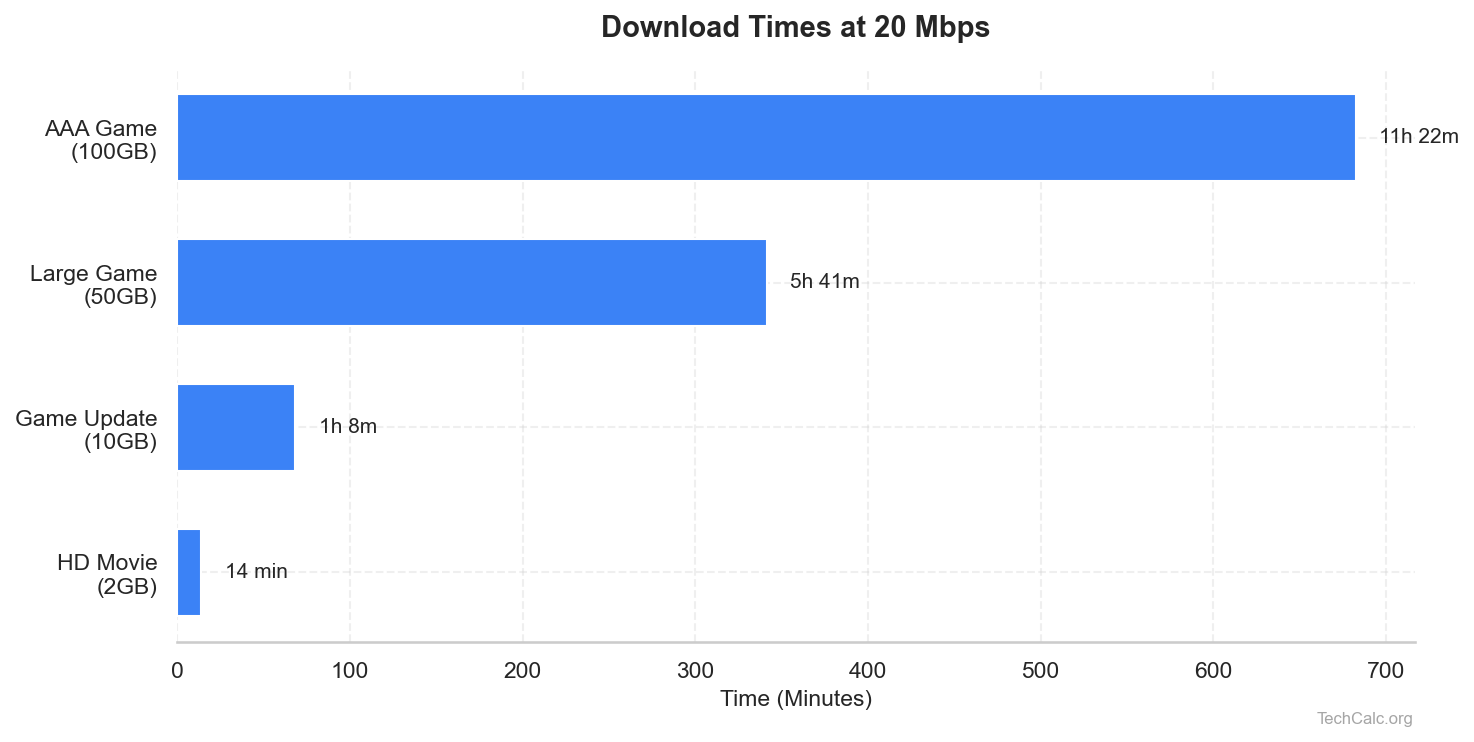
Understanding download times is crucial for evaluating a 20mbps internet speed. Since 20 Mbps equals about 2.5 MBps, we can calculate how long various file sizes will take. This is where our Download Time Calculator becomes incredibly useful, allowing you to quickly input a file size and your connection speed to see the exact estimated time.
Here's a table showing approximate download times for common file sizes with a consistent 20 Mbps connection:
| File Size | Approximate Download Time (at 20 Mbps / 2.5 MBps) |
|---|---|
| 1 MB | Less than 1 second |
| 5 MB | 2 seconds |
| 10 MB | 4 seconds |
| 50 MB | 20 seconds |
| 100 MB | 40 seconds |
| 500 MB | 3 minutes 20 seconds |
| 1 GB (1000 MB) | 6 minutes 40 seconds |
| 5 GB | 33 minutes 20 seconds |
| 10 GB | 1 hour 6 minutes 40 seconds |
| 20 GB | 2 hours 13 minutes 20 seconds |
| 50 GB | 5 hours 33 minutes 20 seconds |
| 100 GB | 11 hours 6 minutes 40 seconds |
As you can see, small files are quick, but large files like modern video games (often 50GB+) or 4K movies can take many hours. If you frequently download large files, a 20mbps internet speed will test your patience. For a more precise calculation tailored to your specific needs, check out our dedicated page for 20 Mbps speed chart.
The "Catch": When 20 Mbps Internet Speed Falls Short
While a 20mbps internet speed offers a baseline for many online activities, its limitations become clear under specific scenarios:
- Multiple Simultaneous Users: This is the biggest killer. If you have a household of 3-4 people, and one is streaming Netflix in HD, another is on a video call, and a third is browsing social media, your 20 Mbps connection will be stretched thin. Add a fourth person downloading an update, and everyone's experience degrades.
- 4K Streaming on Multiple Devices: As noted, a single 4K stream consumes most, if not all, of a 20 Mbps connection. Trying to stream 4K on two TVs simultaneously is simply not feasible.
- Large Game Downloads or Software Updates: Modern video games can range from 50 GB to over 100 GB. Downloading a 100 GB game at 20 Mbps will take over 11 hours. If you download games frequently, this is a significant time commitment. Similarly, large operating system updates (e.g., Windows updates) can also monopolize your bandwidth for extended periods.
- Cloud Backups/Syncing: If you're constantly backing up large photo libraries or video projects to cloud storage, the upload component (which is usually much lower than download speed on a 20 Mbps plan, often 2-5 Mbps) will consume your available bandwidth and slow down other activities.
- Latency-Sensitive Applications: While 20 Mbps offers decent speed, it doesn't always guarantee low latency (ping). For competitive online gaming, where milliseconds matter, a connection that is consistently under strain can lead to higher ping and a less responsive gaming experience.
Factors Affecting Your "Effective" 20 Mbps Speed
The advertised 20mbps internet speed is a theoretical maximum. Several factors can reduce your effective speed, meaning what you actually experience:
- Wi-Fi vs. Ethernet: A wired Ethernet connection almost always provides a more stable and faster connection than Wi-Fi, which can be affected by interference, distance, and obstacles.
- Router Quality and Placement: An old, cheap, or poorly placed router can significantly limit your Wi-Fi speed, even if your incoming internet connection is robust.
- Network Congestion (Local): Too many devices connected to your Wi-Fi network simultaneously can slow things down, even if they're not all actively using bandwidth heavily.
- Network Congestion (ISP/External): During peak hours, your ISP's network might experience congestion, leading to slower speeds for all users in your area.
- Distance from Server: The further away the server you're connecting to (e.g., a gaming server, a streaming service's CDN), the higher your latency and potentially lower your effective speed.
- Device Capabilities: Older devices (laptops, phones) with outdated Wi-Fi adapters might not be able to fully utilize even a 20 Mbps connection.
Comparing 20 Mbps to Other Common Speeds
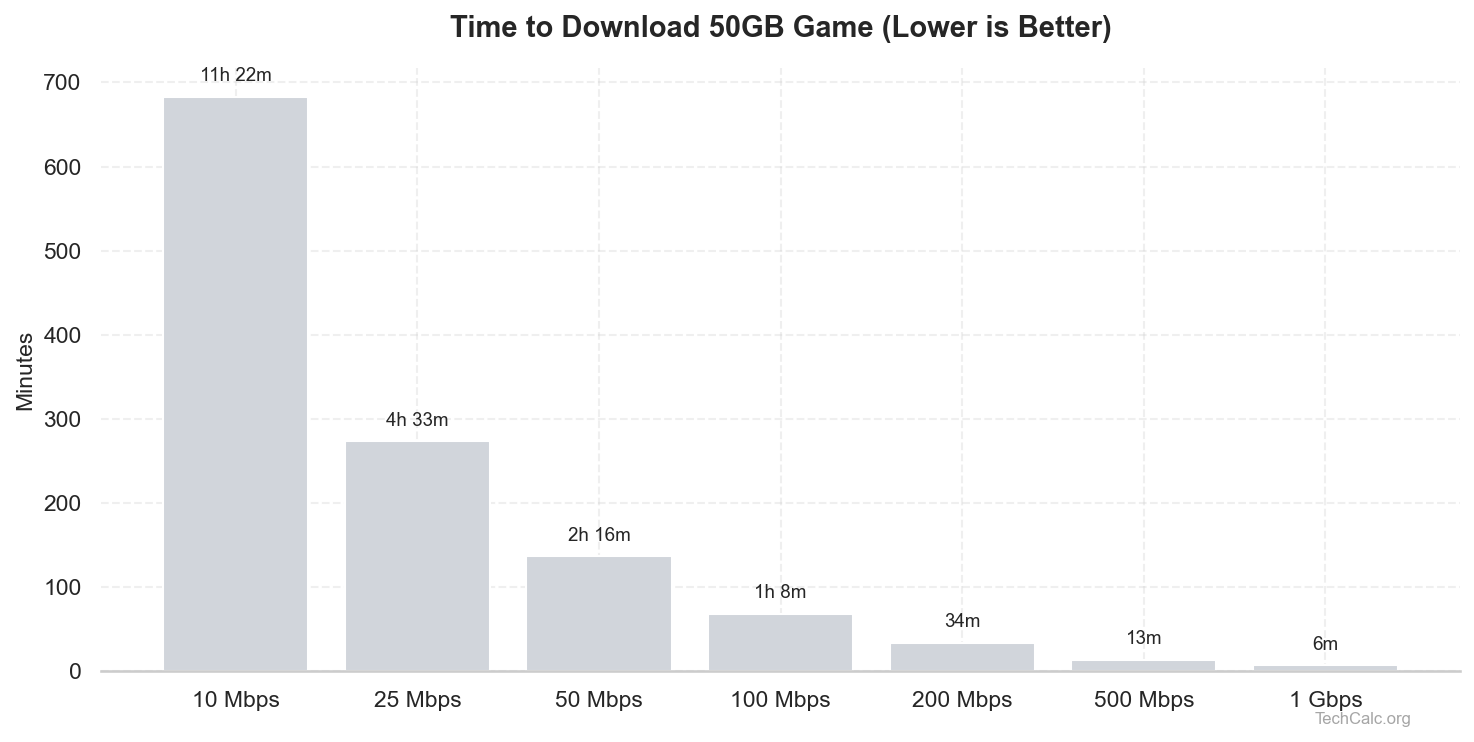
To put a 20mbps internet speed into perspective, let's briefly compare it to other widely available plans in 2025:
- 10 Mbps: This speed is generally considered too slow for modern internet use, even for single users. It struggles with HD streaming and often results in buffering.
- 20 Mbps (Our Focus): A decent baseline for single users or small, light-use households. Struggles with 4K and multiple heavy users.
- 50 Mbps: Often considered the "sweet spot" for many average households. It can comfortably handle 1-2 4K streams, multiple HD streams, and most work-from-home scenarios for a family of 3-4.
- 100 Mbps: A comfortable speed for larger families (4-5+ people) with multiple devices, frequent 4K streaming, and online gaming. Offers plenty of headroom for most activities.
- 200 Mbps+: Ideal for very large households, heavy gamers, content creators, or anyone who frequently downloads/uploads massive files and wants zero slowdowns.
The jump from 20 Mbps to 50 Mbps often provides a noticeable improvement for a relatively small increase in cost, significantly enhancing the multi-user experience.
Who is 20 Mbps Internet Speed Best Suited For?
A 20mbps internet speed is still a viable option for specific user profiles:
- Single Users with Light Habits: If you live alone and primarily use the internet for email, social media, web browsing, and occasional HD streaming.
- Small Households (1-2 People) with Moderate Use: Couples who don't simultaneously stream 4K or engage in heavy online gaming might find it sufficient.
- Budget-Conscious Consumers: For those looking to save money on their internet bill and whose usage patterns fit within the limitations of 20 Mbps.
- Backup/Secondary Connection: Perhaps for a guest house or a seldom-used vacation home where high speeds aren't a priority.
When to Consider an Upgrade From 20 Mbps
If you find yourself frequently experiencing the following issues, it's a clear sign that your 20mbps internet speed is no longer cutting it:
- Frequent Buffering: Especially when streaming HD or attempting 4K content.
- Slow Downloads: Taking hours to download games or large software updates.
- Laggy Video Calls: If your video calls consistently suffer from poor quality, frozen screens, or dropped audio.
- Household Conflicts: Arguments over who can stream or game because the internet is too slow when multiple people are online.
- New Devices: Adding new smart TVs, gaming consoles, or smart home devices that demand more consistent bandwidth.
- Changing Habits: If you've started working from home more, gaming more, or streaming higher-quality content.
Upgrading to 50 Mbps or 100 Mbps will significantly improve your overall internet experience, especially in multi-user environments.
Conclusion
In 2025, a 20mbps internet speed holds its ground as a functional, albeit limited, connection. It's perfectly adequate for individuals or small households engaged in basic web browsing, email, social media, and single-stream HD video. However, its limitations quickly become apparent when multiple users are active, 4K streaming is desired, or large files are frequently downloaded.
The key takeaway is to align your internet speed with your household's specific needs and usage patterns. Don't pay for speed you don't need, but also don't suffer with a connection that constantly frustrates you. If you're unsure, monitor your current usage and consider the number of devices and people actively using the internet in your home. For precise calculations on how long different downloads will take at various speeds, don't hesitate to use our Download Time Calculator at TechCalc. It's a fantastic tool to help you make an informed decision about your internet plan.