No, dedicated 21 9 aspect ratio TVs are extremely rare and virtually non-existent in the consumer market today. While ultrawide monitors are incredibly popular for PC gaming and productivity, the television industry largely standardized on the 16:9 aspect ratio. But here's the catch that often goes unsaid: the reasons for this market shift reveal crucial insights into content consumption and display technology, showing how you can still achieve a cinematic experience without a true 21 9 aspect ratio TV. Let's explore the history, the challenges, and the practical alternatives for your home theater setup in 2026.
⚡ Quick Verdict:
- ✅ Yes for ultrawide PC monitors (gaming, productivity)
- ⚠️ Maybe if using a projector for cinematic movies
- ❌ No for dedicated consumer 21 9 aspect ratio TVs (they aren't widely produced)
- 👉 Key Factor: Content availability and display standardization drives TV market
Is There a 21:9 TV Available in 2026?
As of 2026, finding a new, consumer-grade 21 9 aspect ratio TV from major manufacturers like Samsung, LG, Sony, or Vizio is highly unlikely. There have been a few historical attempts, notably Vizio's "Cinemawide HDTV" around 2012, which featured a 58-inch 21:9 screen. However, these models were niche products and did not gain significant market traction. Today, if you encounter a 21:9 display, it's almost certainly a computer monitor, not a television designed for living room viewing.
The market for TVs has firmly settled on 16:9 as the universal standard. This means that if you're looking for a large-format display for movies, sports, and general entertainment, your options will be overwhelmingly 16:9. While the idea of a 21 9 aspect ratio tv for a truly immersive, cinematic feel is appealing, the reality is that the industry has moved in a different direction.
Why Are TVs Not 21:9? Understanding the Industry Shift
The primary reason why TVs are not 21:9 boils down to a combination of content standardization, manufacturing costs, and consumer preferences.
1. Content Standardization on 16:9: The biggest factor is content. The vast majority of television broadcasts, streaming series, video games, and user-generated content are produced in 16:9. This aspect ratio became the standard for high-definition television (HDTV) in the early 2000s, replacing the older 4:3 standard. If you watch 16:9 content on a 21:9 TV, you would see black bars on the sides of the screen. This is often more distracting for viewers than the black bars on the top and bottom when watching ultrawide movies on a 16:9 TV.
2. Manufacturing and Cost Efficiency: Producing displays in non-standard aspect ratios adds complexity and cost to manufacturing. Panel factories are optimized for 16:9 panels, allowing for economies of scale. Shifting to a 21:9 aspect ratio would require different production lines, leading to higher unit costs, which consumers are generally unwilling to bear for a niche product.
3. Consumer Preference and Versatility: Consumers typically want a versatile TV that handles all types of content well. A 16:9 TV excels at this because most content fits it natively. While a 21 9 aspect ratio TV might be perfect for a specific subset of ultrawide films, it would compromise the viewing experience for everything else. The "Swiss Army knife" approach of 16:9 makes it a more practical choice for the average household.
4. The "Black Bar" Debate: When watching a 2.35:1 or 2.39:1 (cinemascope, which is roughly 21:9) movie on a 16:9 TV, you get black bars at the top and bottom. This is generally accepted. However, watching 16:9 TV shows or sports on a 21:9 TV would result in black bars on the sides, which many viewers find less aesthetically pleasing and more distracting, as it shrinks the perceived size of the main content.
The Allure of the Cinematic 21:9 Aspect Ratio
Despite their scarcity, the appeal of a 21 9 aspect ratio TV is undeniable for cinephiles. This aspect ratio, often referred to as "Cinemascope" or "Ultra-widescreen," closely matches the native aspect ratio of many blockbuster movies. When a film shot in 2.35:1 or 2.39:1 is displayed on a 21:9 screen, it fills the entire display, eliminating the black bars that appear on standard 16:9 TVs. This creates a truly immersive, theatrical experience right in your living room.
For movie lovers, filling the screen entirely with the director's intended vision enhances immersion significantly. It removes the visual distraction of black bars, making you feel more enveloped in the film's world. This is why ultrawide monitors have become so popular for PC gaming, offering a wider field of view that can be incredibly engaging for supported titles. The dream of bringing that same expansive, uninterrupted visual fidelity to the big screen of a television is what continues to fuel interest in the 21 9 aspect ratio TV concept.
The Challenges That Stymied 21:9 TV Adoption
While the cinematic appeal is strong, several practical challenges ultimately prevented the 21 9 aspect ratio TV from becoming mainstream:
- Limited "Native" Content: As mentioned, most content is 16:9. Even though many movies are filmed in ultrawide formats, the overall volume of 16:9 content (TV shows, news, sports, gaming) far outweighs it. A 21:9 TV would mean black bars for the majority of daily viewing.
- Cost vs. Benefit: The added cost of manufacturing niche aspect ratio panels simply didn't justify the limited appeal. Most consumers prioritized versatility and affordability over a specialized cinematic experience.
- Room Integration: A 21:9 TV is significantly wider than a 16:9 TV of comparable height. This can pose challenges for mounting, fitting into existing entertainment units, and overall room aesthetics.
- Resolution and Pixel Density Trade-offs: To maintain a similar pixel density (PPI) to a 16:9 TV, a 21:9 TV would need a much higher horizontal resolution, or it would appear less sharp. For example, a 21:9 TV with the same vertical resolution as a 4K (2160p) 16:9 TV would need a horizontal resolution of ~5040 pixels (21/9 * 2160 = 5040), making it a "5K" ultrawide display. This drives up cost and processing requirements. You can explore how screen size and resolution affect sharpness using our dedicated PPI Calculator.
Achieving a 21:9 Cinematic Experience Without a Dedicated TV
While a true 21 9 aspect ratio TV is off the table, there are still ways to enjoy ultrawide content in its full glory.
Ultrawide Monitors: The PC Gamer's 21:9 Solution
For PC users, ultrawide monitors are incredibly popular. Available in various sizes (from 29 inches to 49 inches) and resolutions (e.g., 2560x1080, 3440x1440, 5120x2160), these displays offer the 21:9 aspect ratio for immersive gaming and boosted productivity. Many high-end ultrawide monitors feature impressive refresh rates and panel technologies like OLED or Mini-LED, providing an exceptional visual experience.
Key benefits of ultrawide monitors:
- Immersive Gaming: A wider field of view in supported games.
- Enhanced Productivity: More screen real estate for multiple windows, ideal for video editing, coding, or graphic design.
- Cinematic Movie Viewing: Fill the screen with ultrawide films from your PC.
However, they are designed for desktop use, not as a primary living room TV.
Projectors: The Ultimate Home Cinema Experience
For those truly dedicated to a cinematic experience, a home theater projector combined with a custom-sized screen is the closest you can get to a 21 9 aspect ratio TV. Many projectors support "anamorphic lenses" which can horizontally stretch a 16:9 image (containing a letterboxed 21:9 film) to fill an ultrawide screen without distortion.
Projector advantages for 21:9:
- Massive Screen Sizes: Achieve screen sizes far beyond what any TV can offer.
- Custom Aspect Ratios: Use a 21:9 screen to perfectly match cinematic content.
- True Immersion: The scale and darkness of a dedicated projector setup create an unparalleled movie-watching environment.
This approach requires more setup and can be more expensive than a TV, but it delivers the most authentic cinematic feel.
How 21:9 Content Appears on a 16:9 TV
When you watch a movie shot in a 2.35:1 or 2.39:1 aspect ratio on a standard 16:9 TV, the video is "letterboxed." This means black bars appear at the top and bottom of the screen to accommodate the wider image. The amount of black bar space depends on the exact aspect ratio of the content.
Here's a comparison of how different content types would appear:
| Content Aspect Ratio | How it Appears on a 16:9 TV | How it Appears on a hypothetical 21:9 TV |
|---|---|---|
| 16:9 (1.78:1) | Fills the screen | Black bars on the sides (pillarboxed) |
| 1.85:1 | Tiny black bars top/bottom | Black bars on the sides (pillarboxed) |
| 2.35:1 (approx. 21:9) | Moderate black bars top/bottom | Fills the screen |
| 2.39:1 (approx. 21:9) | Larger black bars top/bottom | Fills the screen |
| 4:3 (Older TV shows) | Black bars on the sides (pillarboxed) | Even larger black bars on sides (double pillarboxed) |
As you can see, a 16:9 TV is the most versatile for the majority of content available today.
Maximizing Your 16:9 TV for 21:9 Content
Even without a dedicated 21 9 aspect ratio TV, you can enhance the experience of watching ultrawide movies on your 16:9 screen:
- Optimize Viewing Distance: Sitting closer to your TV can make the image feel more immersive, reducing the perceived impact of the black bars.
- Control Room Lighting: Watching movies in a dark room minimizes the visibility of the black bars, as they blend more with the surroundings. OLED TVs are particularly good at this due to their perfect black levels.
- Use TV Zoom/Crop Features (with caution): Some TVs offer zoom or aspect ratio settings that can stretch or crop the image to fill the screen. Be warned that this often distorts the picture or cuts off crucial parts of the film. It's generally not recommended for purists.
- Consider a Larger 16:9 TV: A bigger screen simply makes everything more immersive. If the movie fills a larger portion of your field of view, the black bars become less noticeable.
Understanding Pixel Density with 21:9 Displays
Pixel density, measured in Pixels Per Inch (PPI), is a critical factor in how sharp and detailed an image appears. For a 21 9 aspect ratio TV or monitor, understanding PPI helps in choosing the right resolution for a given screen size. A higher PPI means individual pixels are less visible, resulting in a smoother, more lifelike image, especially when viewed up close.
Our PPI Calculator is an excellent tool for determining the pixel density of any screen. You simply input the screen's diagonal size and resolution, and it calculates the PPI. This is particularly useful when comparing ultrawide monitors to standard 16:9 displays, as the wider aspect ratio can sometimes lead to lower vertical pixel density if the resolution isn't proportionally increased.
Let's look at some examples of PPI for different screen sizes and resolutions, which is crucial for assessing visual quality:
| Diagonal Size | Aspect Ratio | Resolution | PPI (Approx.) |
|---|---|---|---|
| 27 inches | 16:9 | 2560x1440 (QHD) | 109 |
| 34 inches | 21:9 | 3440x1440 (UWQHD) | 109 |
| 49 inches | 32:9 | 5120x1440 (DQHD) | 109 |
| 55 inches | 16:9 | 3840x2160 (4K UHD) | 80 |
| 65 inches | 16:9 | 3840x2160 (4K UHD) | 68 |
| 75 inches | 16:9 | 3840x2160 (4K UHD) | 59 |
| 85 inches | 16:9 | 3840x2160 (4K UHD) | 52 |
Notice how a 34-inch ultrawide monitor with 3440x1440 resolution can maintain a similar PPI to a 27-inch 16:9 QHD monitor, offering excellent sharpness across the wider screen. However, for large TV sizes, achieving high PPI with the available resolutions becomes more challenging. This table highlights why resolution and physical size are crucial when evaluating any display's visual quality, especially if you're considering a non-standard aspect ratio.
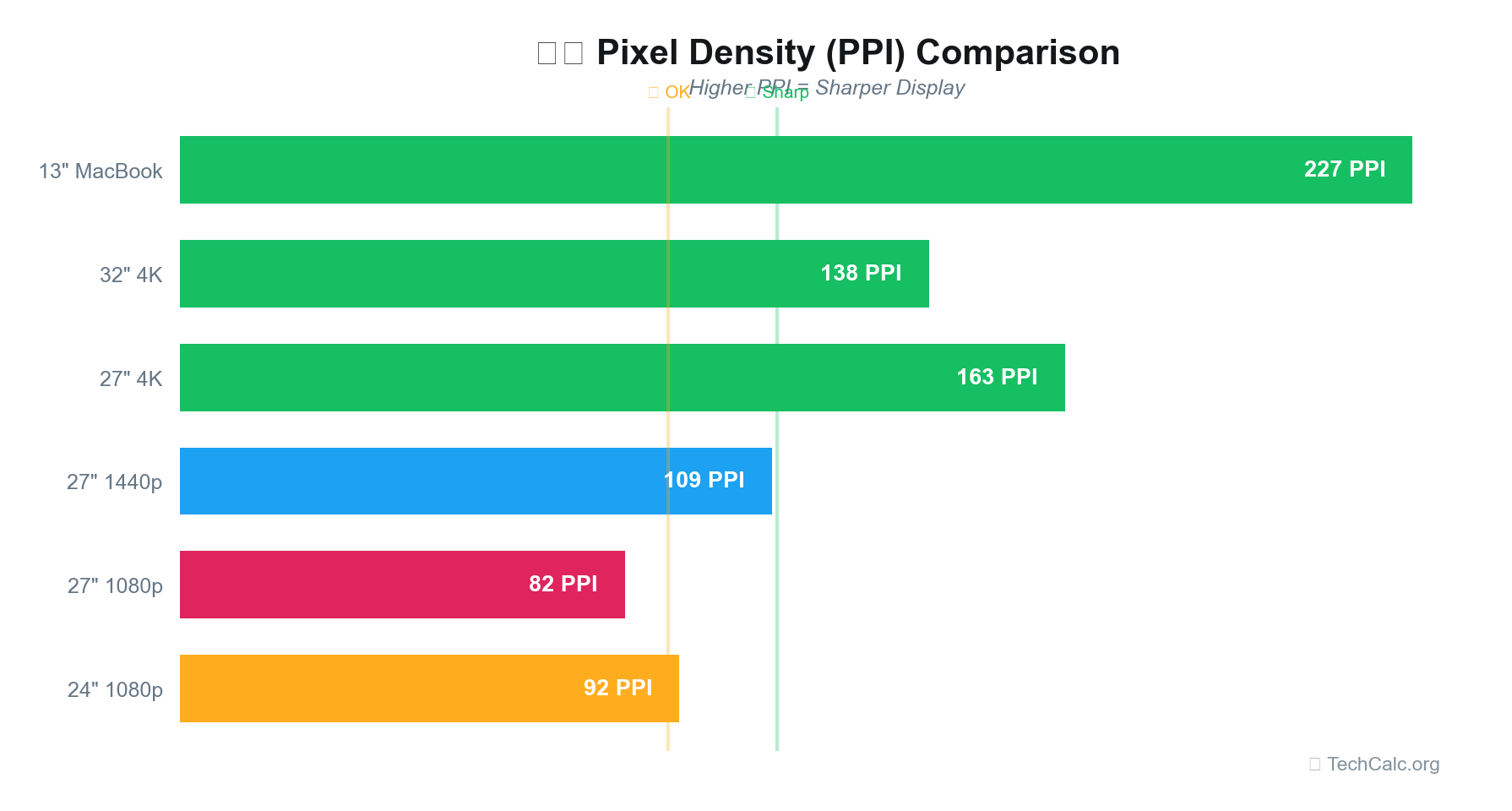
Understanding PPI helps you make informed decisions, ensuring your display, whether it's a 16:9 TV or an ultrawide monitor, delivers the crispness you expect.
The Future of 21 9 Aspect Ratio TV Technology
The likelihood of a widespread resurgence of the 21 9 aspect ratio TV in the consumer market remains low. The industry is heavily invested in 16:9, with advancements focusing on panel technology (OLED, Mini-LED), higher resolutions (8K), and smart TV features, rather than changing the fundamental aspect ratio.
However, niche markets or specialized products could still emerge. For instance, some manufacturers might experiment with modular displays or advanced projection solutions that offer aspect ratio flexibility. The growing popularity of ultrawide monitors for PC gaming and professional use demonstrates that there is a demand for wider aspect ratios in specific contexts. It's just that the traditional living room TV market has different priorities.
For the foreseeable future, if you desire a 21:9 experience, your best bet will remain dedicated ultrawide computer monitors or a high-quality home theater projector setup. These solutions cater to the specific needs of cinematic viewing and immersive gaming without requiring a fundamental shift in the broader television industry.
Final Thoughts on the 21 9 Aspect Ratio TV Trend
While the dream of a mainstream 21 9 aspect ratio TV remains largely unfulfilled in 2026, the reasons behind its absence are rooted in practicalities like content standardization and manufacturing economics. The 16:9 aspect ratio has proven to be the most versatile and cost-effective solution for the diverse content consumption habits of the average household.
For those who crave the truly immersive cinematic experience, options like ultrawide PC monitors and home theater projectors offer excellent alternatives. These specialized displays allow you to enjoy your favorite ultrawide films and games as they were meant to be seen, filling your field of view without compromise. Ultimately, understanding the nuances of aspect ratios and pixel density – which you can easily calculate with our Aspect Ratio Calculator and PPI Calculator – empowers you to make the best display choices for your specific needs, whether for a living room TV or a dedicated media room.